
I frequently get people handing me their expensive Digital SLR cameras and asking me to take a photo for them. They do this in restaurants, airports or touristy places mostly. These are people I don’t know but I obviously have a trusting face as they cheerfully hand over their $1000+ camera to a total stranger.
They make sure to tell me how to take the picture and I always listen intently to their instructions, while Lianne stands back, shakes her head and smiles!
So I bring the camera up to my eye to look through the viewfinder and what do I see? A fuzzy image in the viewfinder even though the camera is auto-focusing correctly. What’s going on….?
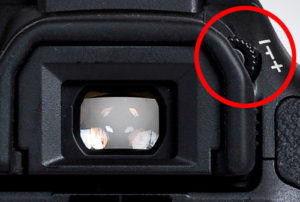 There is a small adjusting wheel or slider right beside the viewfinder eyepiece. It’s usually called the diopter adjuster in your manual. It allows the camera owner to dial in a custom adjustment for their particular eyesight.
When I ask the camera owner if the image in the viewfinder looks sharp and clear to them, they almost always say no. They thought that was just the way it was supposed to be. When I adjust it for them they are amazed at how sharp everything looks when the camera focuses for them.
So if you own a DSLR, make this simple adjustment by pressing halfway down on your shutter button to get the camera to focus. Once it’s in focus let go of the shutter button. While still looking through the viewfinder, move the small wheel or slide beside the eyepiece up and down until the image in your viewfinder is razor sharp.
Everyone I show this to says, “I never knew that was there”. By the way, check it every so often. It can get knocked off it’s setting fairly easily when putting your camera in a case.

