
Here’s a great tip if you want to take more pleasing looking photos indoors with your flash.
If you have a DSLR that is adjustable, you can get much better results with a couple of simple adjustments.
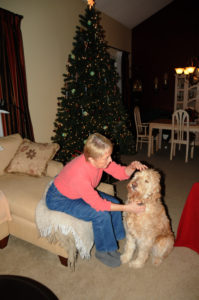 Here’s what you get if the camera is on “Auto” with your flash popped up.
The camera sets the exposure for the flash on the main subject, but the background “ambient” light isn’t captured very well, making you wonder if those nice Christmas tree lights were even turned on.
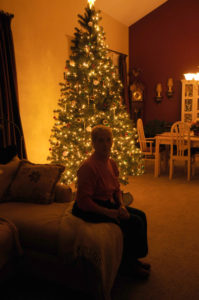 If you take your camera off “Auto” and set it to “Manual”, then you can adjust the exposure to record the background lights by slowing down the shutter speed. This is called “dragging the shutter”. Try setting the shutter to 1/20th of a second, the aperture to f 4 and the ISO to 800.
Take a shot without the flash and see if you like the brightness of the background. If it’s too bright speed up the shutter to 1/30th or 1/60th. If it’s too dark, slow the shutter down to 1/10th of a second or slower. Adjust either way until you like the background exposure
TIP: using a slow shutter speed means you need to hold the camera very still during the exposure. A tripod is recommended.
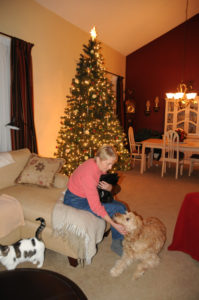 Once it’s good, then pop up the flash and take another shot with the flash. Your subject should be nicely exposed by the flash and the background should have a nice pleasant Christmas glow.
The wonderful thing about digital photography is that you can experiment with different settings and instantly see the results.
The “Point and Shoot” Solution
Even if you don’t have an adjustable DSLR, many “point and shoot” cameras come with preset “scenes”. Try setting yours to “Night Portrait” or “Party” scene mode. This will have somewhat the same effect.

