

Whether you’re a professional photographer or someone who just likes to take pictures, we all rely on those little thin wafers of plastic and other hidden magic ingredients, to record our priceless images.
Yep – those memory cards are everywhere. And the world of digital photography wouldn’t exist without them.
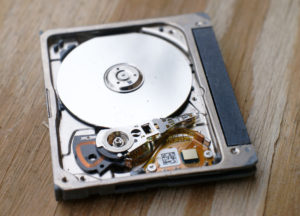 It’s hard to believe that just a few years ago (back at the turn of the century) when digital cameras were first introduced, storage was on a “Microdrive” – a tiny spinning disk that fit in the camera slot. The originals had a capacity of either 170 MEGABYTES or 340 MEGABYTES. With today’s cameras and photo file sizes, you could churn through one of those in about 20 shots! Yikes.
Thankfully now SD memory cards have huge capacity and at a very reasonable price. There’s no need to set your camera to anything but the highest resolution and picture quality.
So what’s the best way to take care of those memory cards, so our photographic memories are safe and sound?
There’s lots of articles out there on the internet about SD cards and how to treat them well. Most of these articles are pretty technical and go into a lot of detail. I’ve provided several links at the end of this post for you “Techies” out there who want to dig a little deeper.
Here’s a few of my “best practices” when it comes to SD cards and not losing precious memories to card problems. Of course this mainly pertains to digital SLR’s and Point-and-Shoot digital cameras, not smartphones.
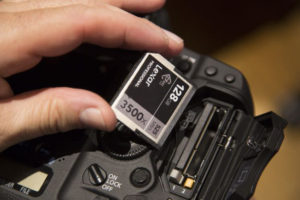 Always format the card in the camera you are going to use it in.
Camera manufacturers format the cards in different ways, so it’s always best to let your camera format the card the way it expects to find it.
Don’t delete single images from your card in the camera.
With large capacity cards, there’s no need to delete when you’re out shooting. The screen on your camera is small and sometimes difficult to see in bright light. Here’s what to do:
Transfer your images to your computer using a good quality card reader. Then cull the duds from the images you transferred on your computer. Leave the images on the card alone.
Once you have transferred your images to your computer and you know they are safe, put the card back in your camera and then use the camera to “format” the card, ready to record new images and video on an empty card.
If you accidentally format a memory card before you have transferred the pictures to your computer, all is not lost. There is recovery software that can find the old images on an erased card, as long as new images haven’t been recorded over top.
Keep the card clean and dry
Keep unused cards in their little cases. That’s easier said than done. Those little cases get lost. So just beware of pocket lint and fingerprints on the metal contacts.
If the card gets wet, dry it off and then let it sit for a couple of days before trying to read the card. If you are successful recovering images from a damaged card, DON’T REUSE IT. For the small price of a new card, don’t take a chance on using one that could be damaged.
Don’t buy huge capacity cards
You might be tempted to buy one of those 500 Bajigabyte* cards and use it to take all of your pictures on your around-the-world cruise. DON’T! If the card fails or something happens to it, you’ve lost ALL of your images. It’s better to have a few smaller cards so your images are spread over several cards rather than having, as they say, all of your eggs in one basket.
* there is no such thing. I just made up a big sounding word 😉
Use two cards when shooting something important
If your camera has two card slots, use one for recording and one as a backup. This is especially important if you are shooting something like a wedding or special event that can’t be repeated. If one of the cards fails, you have a second copy.
Remove cards properly
Always shut off your camera before removing a card. Make sure the camera is not writing to the card when you shut it off. Also, when the card is in the card reader attached to your computer, always eject the card – don’t just pull it out of the reader.
These are just a few of the common sense things to keep in mind when handling your memory cards. Treat them well and you’ll be saying “thanks for the memories” for years to come.
Further reading (with more tech stuff)
Why you should not delete images on your memory card using your camera
https://photographylife.com/how-to-properly-use-and-care-for-memory-cards

