
White balance (WB) refers to how your digital camera “sees” colour under different lighting conditions. Most digital photos are taken with the camera set to “AUTO”. This means that exposure and WB are set by the camera. The camera will try to make the lightest thing in the picture “white”. This works great – most of the time – as long as there is something white in the photo. But it can be fooled if there is nothing truly white in the picture. Take a look at the following photo…

It was taken using Auto White Balance. It looks OK until you see what the flowers really looked like.
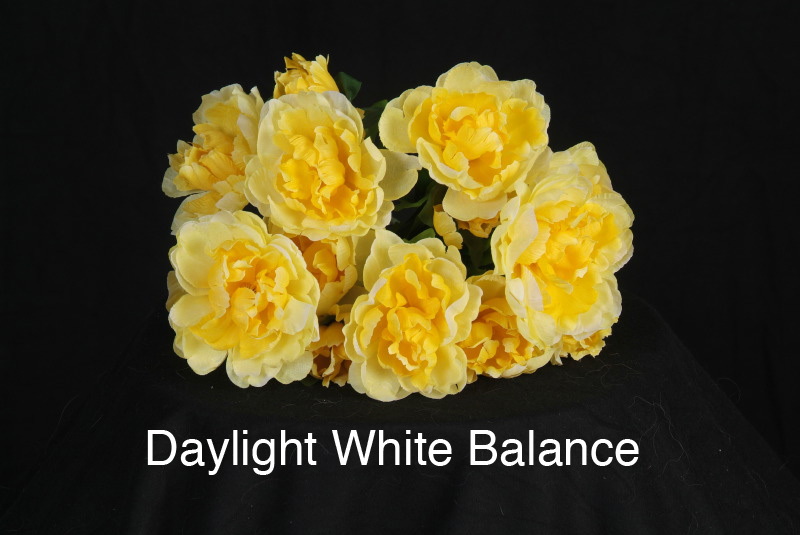
The camera was fooled into thinking that the lightest parts of the YELLOW flowers were white, when they were actually light yellow. The opposite colour to yellow is blue, so the camera added some blue to the “AUTO” photo. In the second photo, the camera WB was set to “Daylight” – the actual lighting that the flowers were exposed under. Now the colours were reproduced much more accurately.
Do your “people subjects” look a little “blue”?
If you find the people in your photos are looking a little “blue”, try setting your camera to the “Cloudy” or “Shade” setting. This will add some yellow to your photos, warming up the skin tone of people in your shots. People look better with warmer skin tones.
Most cameras will have WB settings for Daylight, Cloudy, Shade, Tungsten (that’s indoor regular light bulbs) and Fluorescent. There may also be a “Custom” setting where you can shoot a white surface and set an exact colour balance.
Try different WB settings on the same shot next time you have a willing subject.

